
Context
Telemetry overlays were one of trophi.ai's first features and have shipped through several iterations to get to the polish they have today. A driver copies the telemetry of another lap and then runs as many laps as they want against it, building muscle memory by chasing a trace instead of reading a report after the fact.
Problem
Raw telemetry is dense and arrives too late to actually change behaviour at the wheel. Drivers needed a way to compare themselves against an expert lap live, in a visual language that was readable mid-corner, accessible to drivers with visual impairments, and capable of showing more than one comparison trace at a time without becoming noise.
My role
Lead Product Designer on telemetry overlays. I owned the overlay UX end to end across multiple iterations, including the trace comparison model, the colour and accessibility system, and the multi-trace layout work that made the feature usable at race pace.
Goals
- G1Let drivers compare their inputs against a faster reference lap live on track, instead of after the session.
- G2Make the trace language readable at speed and accessible to drivers with visual impairments.
- G3Support more than one comparison trace per window without overwhelming the driver.
Process
- 01Studied how drivers were already reading telemetry post-session to understand which signals were worth surfacing live.
- 02Prototyped the overlapping-trace model with engineering so the comparison lap could render in real time without dropping frames.
- 03Iterated on trace colours and weights with accessibility in mind, so drivers with visual impairments could still parse the comparison at a glance.
- 04Extended the system to support multiple traces per window, then tested at race pace to confirm the surface stayed readable.
Key design decisions
Decision 01
Overlap, don't summarise
Reducing the comparison to a number lost the part drivers cared about, so the overlay instead overlaps the user's trace directly on top of the reference. Chasing a line is something drivers already know how to do.
Decision 02
Accessible colour first
Trace colours were re-tuned across iterations specifically for visual impairments, because if a driver can't separate the two lines at a glance the whole feature collapses.
Decision 03
More than one trace per window
Allowing multiple traces in a single window unlocked side-by-side comparisons without forcing drivers to context-switch between overlays mid-lap.
Iteration work
From a single blue trace to an accessible multi-trace overlay
The early version of telemetry overlays surfaced a single channel at a time, with the user's trace in white and the reference lap filled in blue. It worked, although drivers could only compare one input per window, and the colour pairing was difficult for users with visual impairments to parse at speed. The newer version overlaps multiple inputs in one window and uses a palette tuned against whocanuse.com so the traces stay distinguishable across common forms of colour blindness.
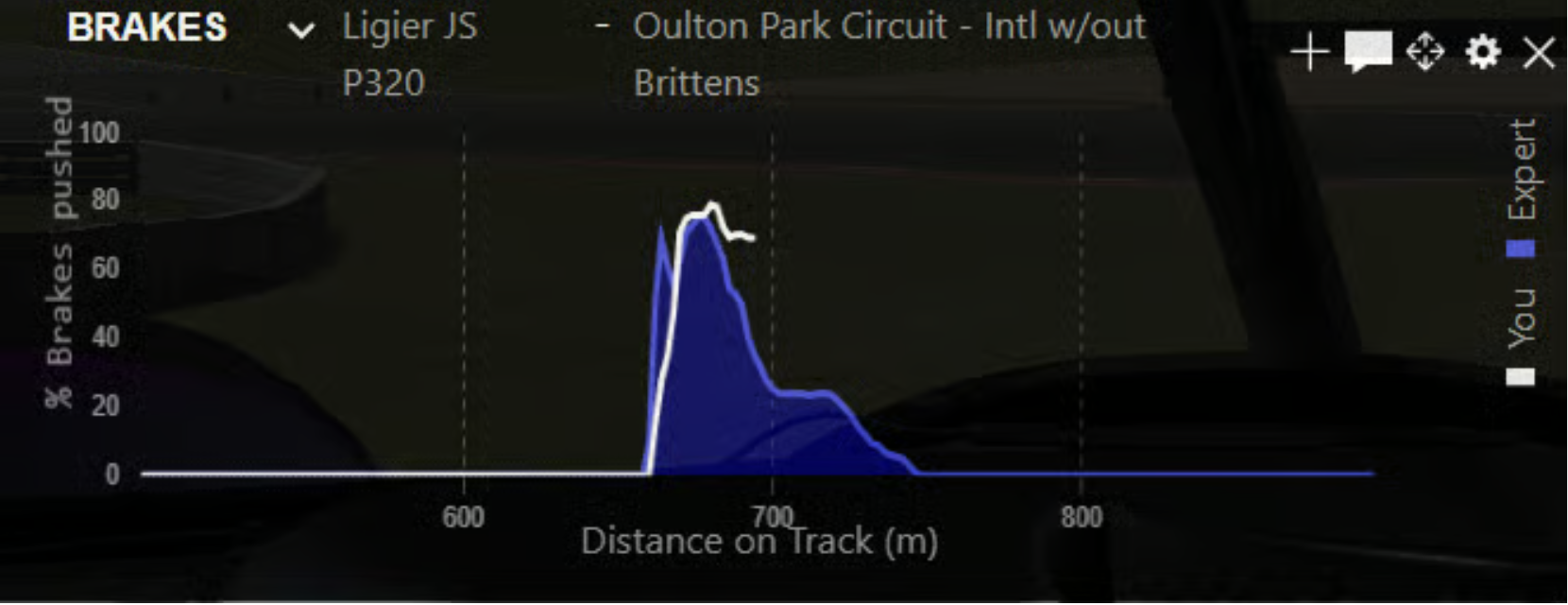
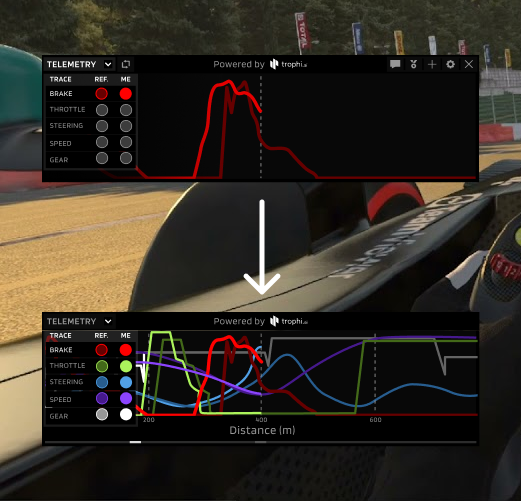
Allowing more than one trace per window meant drivers could see how their inputs related to each other corner by corner, instead of switching between overlays mid-lap. Combined with the colour-blind-safe palette, these changes drove a 107% increase in launches per session within the first month.
User flow
Step 1
Driver copies the telemetry of a faster reference lap into their session.
Step 2
On track, their live inputs render as an overlapping trace against that reference in real time.
Step 3
Driver runs as many laps as they want against the overlay, building muscle memory by chasing the line.
Outcome / impact
“I tend to use [telemetry overlays] when I try to dial myself into a track…Early on, when I'm practicing, I'll use the telemetry overlays when I'm trying to refine my lap later on in the week, as I'm ready for a league race, to try and practice consistently hitting the traces.”
Reflection
Telemetry overlays were the foundational feature of trophi.ai from alpha onward, and they carried most of the platform's early value proposition. Real-time comparison against a faster driver translated dense performance data into something a driver could actually act on. Beyond engagement, the same comparison framework later scaled into Real-Time Skill Assessment and Mansell AI, so in practice overlays became the proof of concept the rest of the coaching platform was built on.
Next project
Interactive Sales Demo